Shell

Shell enables script execution for advanced data processing and automation workflows.
When to use this tool
- Batch data transforms
- Scripted processing pipelines
- Operational automation steps
Configuration
- Define allowed command patterns
- Restrict command scope to safe operations
- Set expected output handling
Example usage
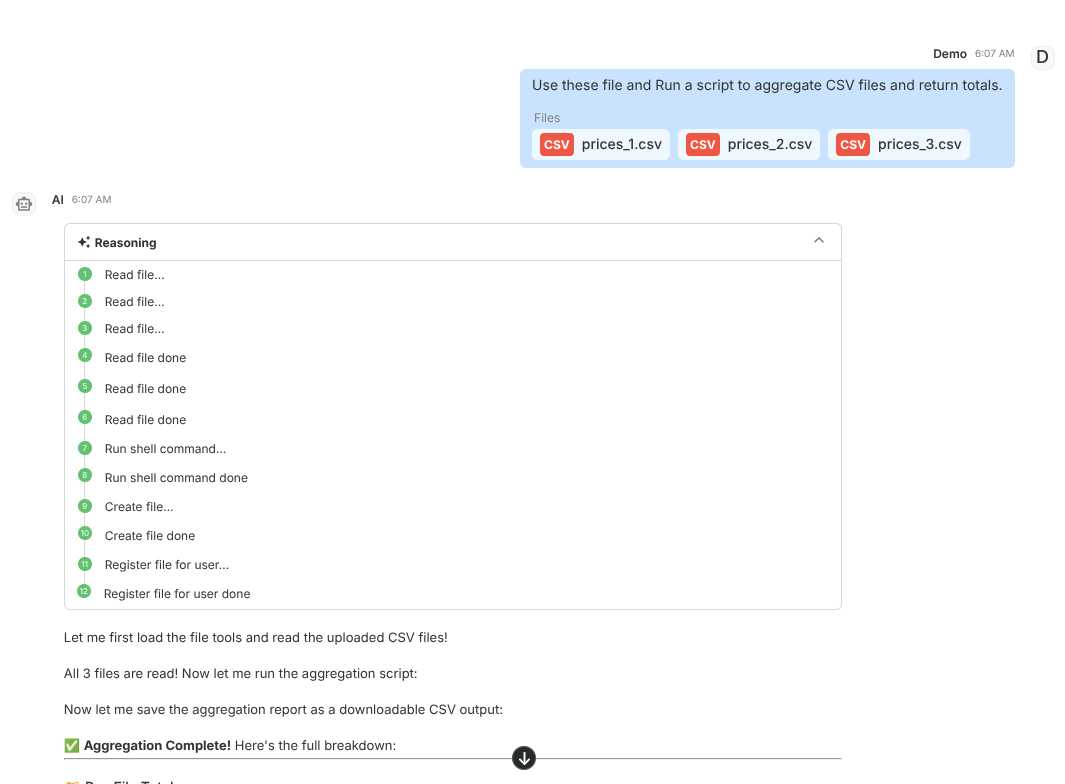
User prompt:
Use these files and run a script to aggregate CSV files and return totals.
Expected behavior:
- Executes permitted shell operations
- Returns command results and summary
- Surfaces execution errors clearly
Validation checklist
- Confirm tool is attached to correct Subagent
- Test both success and failure path in Preview
- Verify deployed behavior in Interact for real user phrasing
Common issues
- Unsafe/unsupported commands fail by policy
- Missing files/paths break command execution
Best practices
- Use minimal required command scope
- Prefer deterministic scripts over ad-hoc commands