Overview
This page gives you the mental model for the entire product so the rest of the docs feel intuitive.
The platform model in one view
| Entity | Purpose | Typical owner |
|---|---|---|
| Workspace | Top-level container for people, permissions, billing, Drive, and Agents | Org admin/owner |
| Agent | Main assistant your users interact with | Builder / product team |
| Subagent | Specialized workflow under an Agent | Builder / ops team |
| Tool | Action capability available to a Subagent | Builder / integrator |
| Drive | Retrieval context (files/links/integrations) | Knowledge/content owner |
At runtime, users talk to an Agent. The Agent routes work to the right Subagent, and the Subagent uses tools + Drive context to complete requests.
How these pieces work together
Workspace
  └── Agent
       ├── Subagent: Scheduling
       │     ├── Tool: Scheduling
       │     └── Drive: Booking Policies
       ├── Subagent: Support Escalation
       │     ├── Tool: Ticket Forwarding
       │     └── Drive: Support SOPs
       └── Subagent: Reporting
             ├── Tool: Report Generation
             └── Drive: KPI Definitions
Product layout
xMagic primarily uses a two-panel experience:
- Sidebar: global navigation + Agent navigation
- Main area: selected page content (Composer, Interact, Threads, etc.)
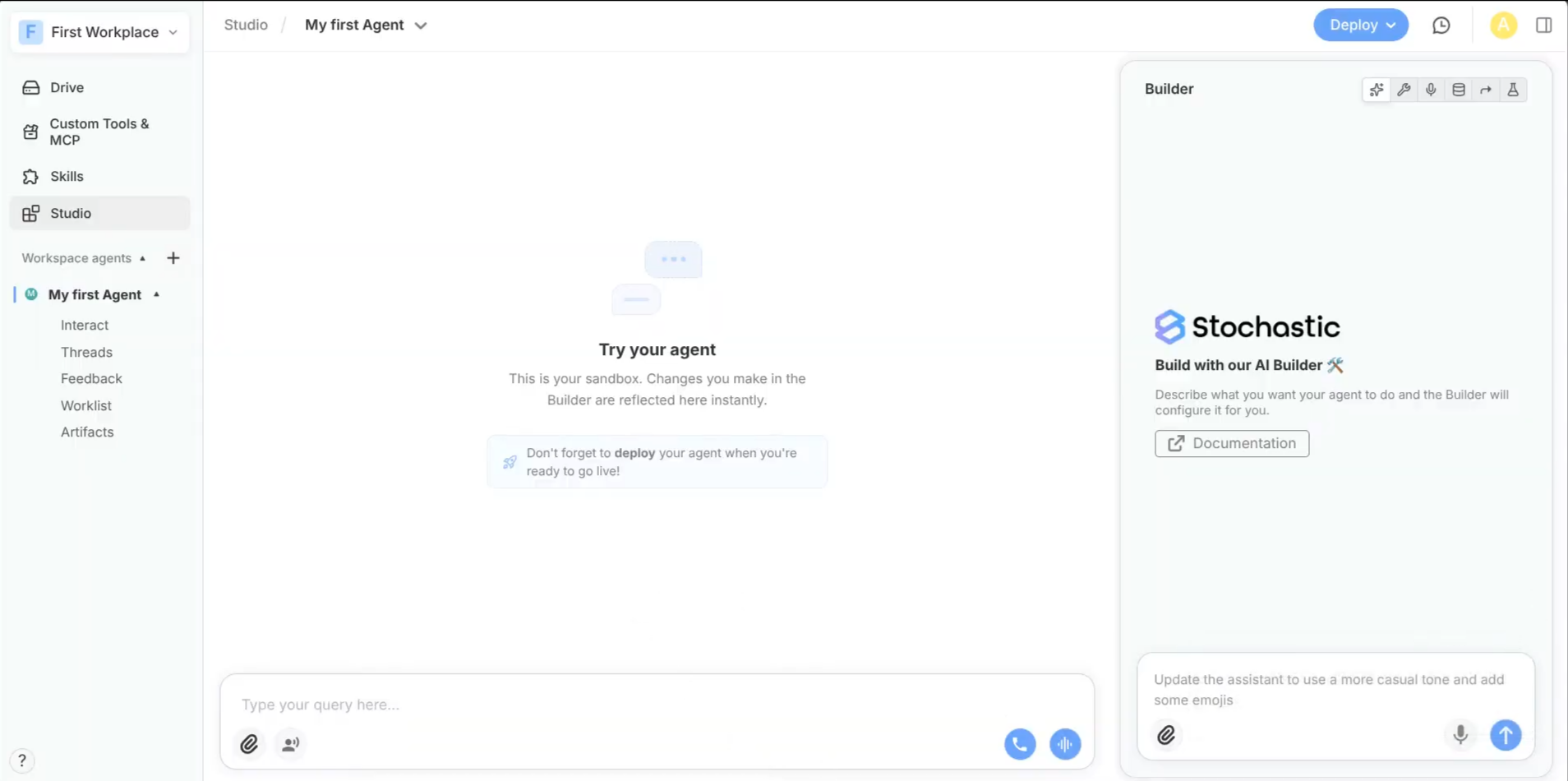
Sidebar navigation model
Global entries
| Item | Why you use it |
|---|---|
| Drive | Manage retrieval content and integrations |
| Skills | Reusable custom capability packages |
| Tools | External tool/service integrations |
| Composer | Configure Agent/Subagents and deploy |
Agent entries
Each Agent can expose:
- Interact
- Threads
- Feedback
- Worklist
- Artifacts
- Composer/Drive-linked config views
Draft vs deployed (important)
xMagic separates draft configuration from deployed runtime behavior.
- In Composer/Preview, you test draft changes.
- In Interact/public usage, users hit deployed behavior.
Use this model intentionally:
- Build in draft
- Validate
- Deploy version
- Monitor
- Iterate
Typical lifecycle
- Create Agent
- Define Subagents
- Attach tools
- Attach Drive folders
- Test in Preview
- Save version
- Deploy
- Monitor Threads/Feedback/Worklist
- Improve and redeploy
Permission-aware experience
What you see and can do depends on workspace privileges:
- creating/editing/deleting Agents/Subagents
- viewing/editing private Drive
- Skills management
- billing/member management
If something appears missing, check role privileges first.
Best practices
- Start simple: one Agent + few focused Subagents
- Keep Subagent responsibilities narrow
- Attach only relevant tools per Subagent
- Keep Drive folders domain-specific
- Treat deployment as a release process, not a save action