Secure Folders API Documentation – xMagic
1. Overview
Secure Folders (also called File Buckets) are token-gated file scopes. They let you upload files, grant access to specific users or virtual users, and attach folders to agents. When a query is sent with a bucket_id, the agent can only access files that belong to that folder — and only if the requesting user holds a valid token for it.
Two gates must pass on every query:
- Gate 1 — the secure folder must be attached to the agent receiving the query.
- Gate 2 — the requesting user (or their virtual user identity) must hold a valid token for the folder.
Output files generated by the agent during a query are automatically registered into the same folder.
Recommended: Manage Secure Folders from the UI
Everything below is also available through the API, but we recommend creating and managing Secure Folders from the xMagic UI — it's faster, and the permission model is enforced automatically.
Where to find it
Go to Drive, then switch to the Secure Folders tab.
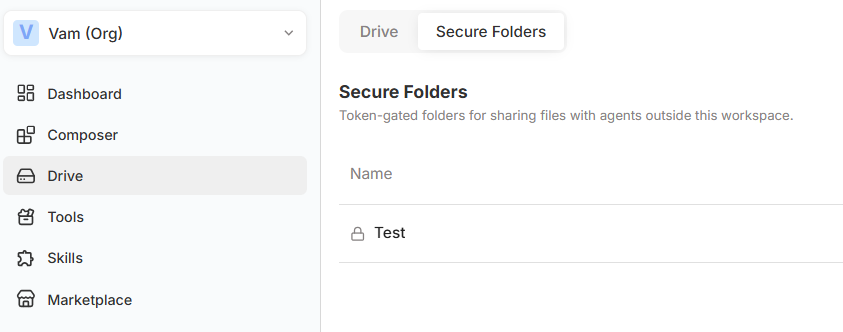
Click Create secure folder, give it a name, and you're done — the folder appears in the list immediately and you're automatically granted access as its creator.
Who can do what
| Action | Org owner / Org admin | Folder creator | Other members |
|---|---|---|---|
| View the folder and browse its files | ✅ | ✅ | ✅ |
| Manage access (grant/revoke) | ✅ | ✅ | ❌ |
| Attach / detach the folder from an agent | ✅ | ✅ | ❌ |
| Rotate the access token | ✅ | ✅ | ❌ |
| Delete the folder | ✅ | ✅ | ❌ |
| See the bucket ID and file IDs | ✅ | ✅ | ❌ |
Org owners, org admins, and the user who created the folder get full control via the kebab menu on each row:
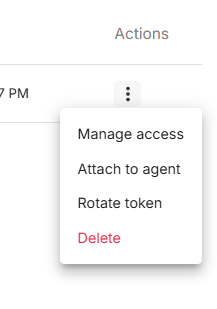
Everyone else in the organization can open the folder and browse its input/output files, but the bucket ID, file IDs, and the actions above stay hidden for them.
Granting access
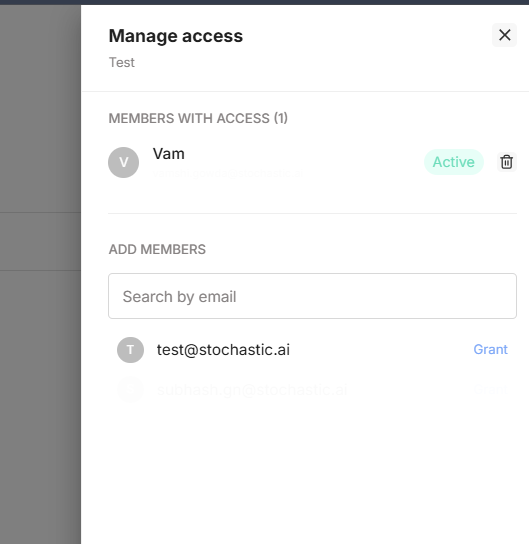
Manage access opens a panel listing everyone who currently holds a token for the folder. Search by email to grant access to another organization member or virtual user; use the trash icon to revoke access.
Attaching an agent
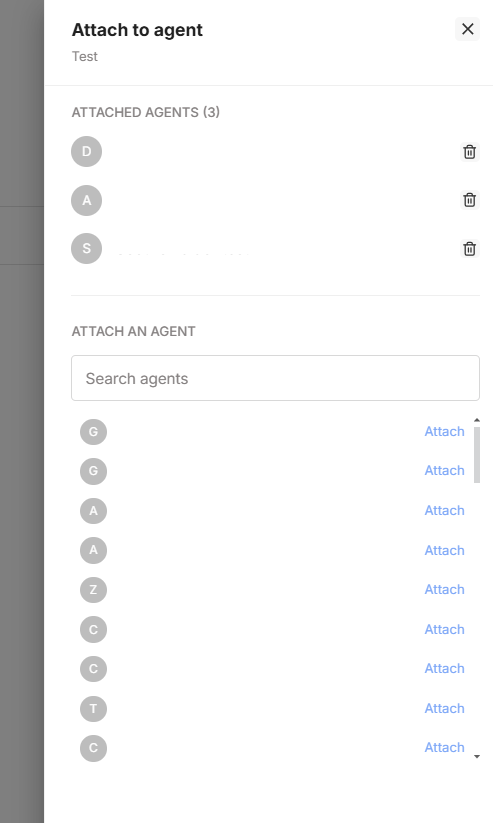
An agent can only use a folder's files once the folder is attached to it (this is Gate 1 — see Key Concepts below). Use Attach to agent to pick which agents can use this folder, or detach them later from the same panel.
Putting it together
- Create the folder from the UI and note its ID (only visible to owners, admins, and the creator).
- Attach it to the agent(s) that should use it.
- Grant access to the users (or virtual users) who should be able to query through it.
- Upload files with
bucket_idset — these become input files in the folder (see 4.5. Upload File to Secure Folder). - Send queries with
bucket_idset (see 4.6. Send Query Using Secure Folder). Any file the agent generates during that query is automatically registered as an output file in the same folder — no extra step required. - Retrieve those output files from Get Message by ID: when the chat used a
bucket_id, the response includesbucket_idandoutput_bucket_files(a map of file ID → presigned download URL).
⚠️ Token rotation is destructive. Rotating a folder's access token immediately revokes access for every user who previously had it. You'll need to re-grant access to each user afterward, so only rotate the token if you suspect it has been compromised.
2. Authentication & Base URL
See the Authentication page for details on API keys.
Base URL:
https://api.xmagic.ai/xmagic-backend/v1
3. Key Concepts
Access tokens
Every secure folder has an access token. When you create a folder, the token is returned once — store it securely, it is never shown again. You distribute this token to grant users access. If you rotate the token, all existing grants are immediately invalidated and users must be re-granted access with the new token.
Token rotation
Rotating a token is a destructive operation. Every user who previously had access loses it. The new token is not shown after rotation — only a success confirmation is returned. Re-grant access to each user manually after rotation.
Virtual users
A virtual user can be granted access to a secure folder by passing their email to the grant-access endpoint. When a virtual user sends a query, the system first checks the real user's token repository, then the virtual user's. If the real user (the API key holder) already has access, their virtual users inherit it implicitly. If the virtual user was created by a different API key holder, they need an explicit grant.
4. API Endpoints
4.1. Create Secure Folder
Creates a new secure folder. The creating user is automatically granted access.
Endpoint
POST /file-buckets/
Authentication
Required header:
x-api-key: YOUR_API_KEY
Request Body (JSON)
| Parameter | Type | Required | Description |
|---|---|---|---|
| name | string | Yes | Name of the secure folder |
Example Request
curl -X POST "https://api.xmagic.ai/xmagic-backend/v1/file-buckets/" \
  -H "x-api-key: YOUR_API_KEY" \
  -H "Content-Type: application/json" \
  -d '{"name": "Patient Records Q4"}'
Success Response
Status Code: 200 OK
{
  "data": {
    "id": "6ac782e2a9f3c30a4369ebda",
    "name": "Patient Records Q4",
    "access_token": "t_Kx9mR2vLpQnZwYj4aBcDeFgH...",
    "created_at": "2026-10-08T12:00:00Z"
  }
}
Important:
access_tokenis returned only once on creation. Copy and store it securely — it cannot be retrieved again. Distribute it to users who need access.
4.2. List Secure Folders
Returns all active secure folders in the organization. Access tokens are never exposed in list responses.
Endpoint
GET /file-buckets/
Authentication
Required header:
x-api-key: YOUR_API_KEY
Example Request
curl -X GET "https://api.xmagic.ai/xmagic-backend/v1/file-buckets/" \
  -H "x-api-key: YOUR_API_KEY"
Success Response
Status Code: 200 OK
{
  "data": [
    {
      "id": "6ac782e2a9f3c30a4369ebda",
      "name": "Patient Records Q4",
      "created_by": "66fd0df4839dc19505352df7",
      "created_at": "2026-10-08T12:00:00Z"
    }
  ]
}
4.3. Get Secure Folder
Returns details of a single secure folder.
Endpoint
GET /file-buckets/{bucket_id}
Path Parameters
| Parameter | Type | Required | Description |
|---|---|---|---|
| bucket_id | string | Yes | The unique identifier of the folder |
Example Request
curl -X GET "https://api.xmagic.ai/xmagic-backend/v1/file-buckets/{bucket_id}" \
  -H "x-api-key: YOUR_API_KEY"
Success Response
Status Code: 200 OK
{
  "data": {
    "id": "6ac782e2a9f3c30a4369ebda",
    "name": "Patient Records Q4",
    "created_by": "66fd0df4839dc19505352df7",
    "created_at": "2026-10-08T12:00:00Z"
  }
}
4.4. Delete Secure Folder
Permanently deletes a secure folder. All token grants are revoked and files are disassociated from the folder. Files themselves are not deleted. Only the folder creator, org admins, and org owners can delete a folder.
Endpoint
DELETE /file-buckets/{bucket_id}
Path Parameters
| Parameter | Type | Required | Description |
|---|---|---|---|
| bucket_id | string | Yes | The unique identifier of the folder |
Example Request
curl -X DELETE "https://api.xmagic.ai/xmagic-backend/v1/file-buckets/{bucket_id}" \
  -H "x-api-key: YOUR_API_KEY"
Success Response
Status Code: 200 OK
{
  "data": {
    "deleted": true,
    "bucket_id": "6ac782e2a9f3c30a4369ebda"
  }
}
4.5. Upload File to Secure Folder
Uploads a file and places it into a secure folder. The uploading user must hold a valid token for the folder.
Endpoint
POST /uploaded-files
Authentication
Required header:
x-api-key: YOUR_API_KEY
Request Parameters (Form Data)
| Parameter | Type | Required | Description |
|---|---|---|---|
| file | file | Yes | The file to upload (multipart/form-data) |
| bucket_id | string | No | Secure folder ID. The file is placed into this folder. |
| virtual_user_email | string | No | Email of the person uploading the file. |
Example Request
curl -X POST "https://api.xmagic.ai/xmagic-backend/v1/uploaded-files" \
  -H "x-api-key: YOUR_API_KEY" \
  -F "file=@/path/to/document.pdf" \
  -F "bucket_id=6ac782e2a9f3c30a4369ebda"
Success Response
Status Code: 200 OK
{
  "data": "6ac78464a9f3c30a4369ebde"
}
The returned string is the file ID. Use it in the uploaded_files array when sending a query.
Error Responses
| Status | Reason |
|---|---|
403 | The uploading user does not hold a valid token for the specified folder. |
404 | The specified folder does not exist or does not belong to this organization. |
4.6. Send Query Using Secure Folder
Sends a query to an agent with files from a secure folder. Both gates must pass — the folder must be attached to the agent and the requesting user must hold a valid token.
Endpoint
POST /agents/{agent_id}/chats/{chat_id}/query
Additional Request Body Fields
| Parameter | Type | Required | Description |
|---|---|---|---|
| bucket_id | string | No | Secure folder ID. File lookup is scoped to this folder. |
| uploaded_files | string[] | No | File IDs to include. Must belong to the specified folder. |
When bucket_id is provided, only files belonging to that folder are accessible. The user's personal files are not included. Files from other folders are not accessible even if the user holds tokens for them.
Example Request
curl -X POST "https://api.xmagic.ai/xmagic-backend/v1/agents/{agent_id}/chats/{chat_id}/query" \
  -H "x-api-key: YOUR_API_KEY" \
  -H "Content-Type: application/json" \
  -d '{
    "query": "Summarize the uploaded patient record",
    "uploaded_files": ["6ac78464a9f3c30a4369ebde"],
    "bucket_id": "6ac782e2a9f3c30a4369ebda",
    "is_stream": false
  }'
Error Responses
| Status | Reason |
|---|---|
403 | Folder is not attached to this agent (Gate 1 failed). |
403 | Requesting user does not hold a valid token for this folder (Gate 2 failed). |
403 | One or more file IDs do not belong to the specified folder. |
404 | Folder not found. |
Note: Output files generated by the agent during this query are automatically registered into the same folder. They appear in the folder's output files list and can be retrieved in subsequent queries using the same
bucket_id.
4.7. List Files in Secure Folder
Returns all files in a secure folder, optionally filtered by type.
Endpoint
GET /file-buckets/{bucket_id}/files
Query Parameters
| Parameter | Type | Required | Default | Description |
|---|---|---|---|---|
| file_type | string | No | all | Filter by input (user-uploaded) or output (agent-generated). Omit for all files. |
| page | integer | No | 0 | Page number (0-indexed). |
| page_size | integer | No | 50 | Number of files per page. |
Example Request
# All files
curl -X GET "https://api.xmagic.ai/xmagic-backend/v1/file-buckets/{bucket_id}/files" \
  -H "x-api-key: YOUR_API_KEY"

# Input files only
curl -X GET "https://api.xmagic.ai/xmagic-backend/v1/file-buckets/{bucket_id}/files?file_type=input" \
  -H "x-api-key: YOUR_API_KEY"

# Output files only
curl -X GET "https://api.xmagic.ai/xmagic-backend/v1/file-buckets/{bucket_id}/files?file_type=output" \
  -H "x-api-key: YOUR_API_KEY"
Success Response
Status Code: 200 OK
{
  "data": {
    "files": [
      {
        "id": "6ac78464a9f3c30a4369ebde",
        "file_name": "patient_record.pdf",
        "file_type": "input",
        "created_at": "2026-10-08T12:05:00Z",
        "user_id": "66fd0df4839dc19505352df7",
        "virtual_user_id": null,
        "persona_id": null
      },
      {
        "id": "6ac78512a9f3c30a4369ebdf",
        "file_name": "summary_report.json",
        "file_type": "output",
        "created_at": "2026-10-08T12:07:30Z",
        "user_id": "66fd0df4839dc19505352df7",
        "virtual_user_id": null,
        "persona_id": "6960e9d0f419122be629dc5c"
      }
    ],
    "total": 2,
    "page": 0,
    "page_size": 50,
    "has_more": false
  }
}
File object fields
| Field | Type | Description |
|---|---|---|
id | string | File ID. Use in uploaded_files on a query. |
file_name | string | Original filename. |
file_type | string | input for user-uploaded files, output for agent-generated. |
created_at | string | ISO 8601 timestamp. |
user_id | string | ID of the user who uploaded or triggered the file. |
virtual_user_id | string | null | Virtual user ID if the file was attributed to a virtual user. |
persona_id | string | null | Agent ID that generated this file. Present on output files only. |
4.8. Grant Access
Grants a real user or virtual user access to a secure folder. Only the folder creator, org admins, and org owners can grant access.
Endpoint
POST /file-buckets/{bucket_id}/grant-access
Request Body (JSON)
Provide exactly one of user_id or virtual_user_email.
| Parameter | Type | Required | Description |
|---|---|---|---|
| user_id | string | No | ID of the real user to grant access to. |
| virtual_user_email | string | No | Email of the virtual user to grant access to. The virtual user must already exist in the organization. |
Example Request (real user)
curl -X POST "https://api.xmagic.ai/xmagic-backend/v1/file-buckets/{bucket_id}/grant-access" \
  -H "x-api-key: YOUR_API_KEY" \
  -H "Content-Type: application/json" \
  -d '{"user_id": "66fd0df4839dc19505352df7"}'
Example Request (virtual user)
curl -X POST "https://api.xmagic.ai/xmagic-backend/v1/file-buckets/{bucket_id}/grant-access" \
  -H "x-api-key: YOUR_API_KEY" \
  -H "Content-Type: application/json" \
  -d '{"virtual_user_email": "alice@example.com"}'
Success Response
Status Code: 200 OK
{
  "data": {
    "bucket_id": "6ac782e2a9f3c30a4369ebda",
    "granted_to_user_id": "66fd0df4839dc19505352df7",
    "granted_to_virtual_user_id": null
  }
}
4.9. Revoke Access
Revokes a user or virtual user's access to a secure folder. Only the folder creator, org admins, and org owners can revoke access.
Endpoint
DELETE /file-buckets/{bucket_id}/revoke-access
Request Body (JSON)
Provide exactly one of user_id or virtual_user_email.
| Parameter | Type | Required | Description |
|---|---|---|---|
| user_id | string | No | ID of the real user to revoke access from. |
| virtual_user_email | string | No | Email of the virtual user to revoke access from. |
Example Request
curl -X DELETE "https://api.xmagic.ai/xmagic-backend/v1/file-buckets/{bucket_id}/revoke-access" \
  -H "x-api-key: YOUR_API_KEY" \
  -H "Content-Type: application/json" \
  -d '{"user_id": "66fd0df4839dc19505352df7"}'
Success Response
Status Code: 200 OK
{
  "data": {
    "revoked": true
  }
}
4.10. Rotate Access Token
Regenerates the folder's access token. All existing grants are immediately invalidated. Only the folder creator, org admins, and org owners can rotate the token.
Warning: This operation cannot be undone. Every user who previously had access will lose it immediately. You must re-grant access to each user after rotation.
Endpoint
POST /file-buckets/{bucket_id}/rotate-token
Example Request
curl -X POST "https://api.xmagic.ai/xmagic-backend/v1/file-buckets/{bucket_id}/rotate-token" \
  -H "x-api-key: YOUR_API_KEY"
Success Response
Status Code: 200 OK
{
  "data": {
    "bucket_id": "6ac782e2a9f3c30a4369ebda",
    "rotated": true
  }
}
After rotation, re-grant access to each user via Grant Access.
4.11. Attach Folder to Agent
Attaches a secure folder to an agent (Gate 1). After attachment, users who hold a valid token can include this folder's files in queries to that agent. Only the folder creator, org admins, and org owners can attach.
Endpoint
POST /file-buckets/{bucket_id}/attach
Request Body (JSON)
| Parameter | Type | Required | Description |
|---|---|---|---|
| persona_id | string | Yes | The unique identifier of the agent |
Example Request
curl -X POST "https://api.xmagic.ai/xmagic-backend/v1/file-buckets/{bucket_id}/attach" \
  -H "x-api-key: YOUR_API_KEY" \
  -H "Content-Type: application/json" \
  -d '{"persona_id": "6960e9d0f419122be629dc5c"}'
Success Response
Status Code: 200 OK
{
  "data": {
    "bucket_id": "6ac782e2a9f3c30a4369ebda",
    "persona_id": "6960e9d0f419122be629dc5c",
    "attached": true
  }
}
4.12. Detach Folder from Agent
Removes a secure folder attachment from an agent. Users retain their token grants — they just cannot use this folder with this agent until it is re-attached. Only the folder creator, org admins, and org owners can detach.
Endpoint
DELETE /file-buckets/{bucket_id}/detach
Request Body (JSON)
| Parameter | Type | Required | Description |
|---|---|---|---|
| persona_id | string | Yes | The unique identifier of the agent |
Example Request
curl -X DELETE "https://api.xmagic.ai/xmagic-backend/v1/file-buckets/{bucket_id}/detach" \
  -H "x-api-key: YOUR_API_KEY" \
  -H "Content-Type: application/json" \
  -d '{"persona_id": "6960e9d0f419122be629dc5c"}'
Success Response
Status Code: 200 OK
{
  "data": {
    "bucket_id": "6ac782e2a9f3c30a4369ebda",
    "persona_id": "6960e9d0f419122be629dc5c",
    "attached": false
  }
}
4.13. List Agents Attached to a Folder
Returns all agents this folder is currently attached to.
Endpoint
GET /file-buckets/{bucket_id}/attachments
Example Request
curl -X GET "https://api.xmagic.ai/xmagic-backend/v1/file-buckets/{bucket_id}/attachments" \
  -H "x-api-key: YOUR_API_KEY"
Success Response
Status Code: 200 OK
{
  "data": {
    "attachments": [
      {
        "persona_id": "6960e9d0f419122be629dc5c",
        "persona_name": "doc processor destinations"
      }
    ],
    "total": 1
  }
}
4.14. List Folders Attached to an Agent
Returns all active secure folders attached to a specific agent.
Endpoint
GET /file-buckets/agent/{persona_id}
Path Parameters
| Parameter | Type | Required | Description |
|---|---|---|---|
| persona_id | string | Yes | The unique identifier of the agent |
Example Request
curl -X GET "https://api.xmagic.ai/xmagic-backend/v1/file-buckets/agent/{persona_id}" \
  -H "x-api-key: YOUR_API_KEY"
Success Response
Status Code: 200 OK
{
  "data": {
    "buckets": [
      {
        "id": "6ac782e2a9f3c30a4369ebda",
        "name": "Patient Records Q4",
        "created_by": "66fd0df4839dc19505352df7",
        "created_at": "2026-10-08T12:00:00Z"
      }
    ],
    "total": 1,
    "persona_id": "6960e9d0f419122be629dc5c"
  }
}
4.15. List My Accessible Folders
Returns all active secure folders the authenticated user currently holds a valid token for.
Endpoint
GET /file-buckets/my/access
Example Request
curl -X GET "https://api.xmagic.ai/xmagic-backend/v1/file-buckets/my/access" \
  -H "x-api-key: YOUR_API_KEY"
Success Response
Status Code: 200 OK
{
  "data": {
    "buckets": [
      {
        "id": "6ac782e2a9f3c30a4369ebda",
        "name": "Patient Records Q4",
        "created_by": "66fd0df4839dc19505352df7",
        "created_at": "2026-10-08T12:00:00Z",
        "granted_at": "2026-10-08T12:01:00Z"
      }
    ],
    "total": 1
  }
}
Folders where the token has been rotated since the grant are excluded — those grants are stale and must be re-issued.
5. End-to-End Example
Steps 1 and 2 (creating the folder and attaching it to an agent) are shown here via the API for completeness, but we recommend doing both from the UI instead — see Recommended: Manage Secure Folders from the UI.
# 1. Create a secure folder
curl -X POST ".../v1/file-buckets/" \
  -H "x-api-key: YOUR_API_KEY" \
  -d '{"name": "Patient Records Q4"}'
# → save id as BUCKET_ID, save access_token (shown once)

# 2. Attach the folder to an agent
curl -X POST ".../v1/file-buckets/$BUCKET_ID/attach" \
  -H "x-api-key: YOUR_API_KEY" \
  -d '{"persona_id": "AGENT_ID"}'

# 3. Upload a file into the folder
curl -X POST ".../v1/uploaded-files" \
  -H "x-api-key: YOUR_API_KEY" \
  -F "file=@record.pdf" \
  -F "bucket_id=$BUCKET_ID"
# → save returned string as FILE_ID

# 4. Query the agent using the folder
curl -X POST ".../v1/agents/AGENT_ID/chats/CHAT_ID/query" \
  -H "x-api-key: YOUR_API_KEY" \
  -d '{
    "query": "Summarize this record",
    "uploaded_files": ["FILE_ID"],
    "bucket_id": "BUCKET_ID"
  }'

# 5. Check files in the folder
curl ".../v1/file-buckets/$BUCKET_ID/files?file_type=output" \
  -H "x-api-key: YOUR_API_KEY"
# → any agent-generated files appear here
6. Error Reference
| Status | Error code | Reason |
|---|---|---|
400 | VALIDATION_ERROR | Missing required field or invalid format. |
403 | PERMISSION_DENIED | Folder not attached to agent, user lacks a valid token, or operation requires owner/admin/creator role. |
404 | NOT_FOUND | Folder, agent, or user not found. |
500 | — | Internal server error. Retry with exponential backoff. |